
Understand your spending.
Plan ahead for credit card payments.
Build a budget around your own categories, explore the transactions behind your spending, and estimate upcoming credit card payments in one downloadable Excel workbook.
Import your transaction history, complete the initial setup, and return to a financial review built around your own numbers.
Microsoft Excel required. No subscription required. No direct bank connection required.
Give your financial review more context
A spend total answers one question. The transactions behind it can explain why it changed. Upcoming credit card payments add another piece: what that spending means for your money in the weeks ahead.
The GetMeFi workbook brings those details together so you can investigate spending, adjust your budget, and evaluate upcoming cash requirements with more context.
One-time purchase
No recurring subscription
No bank connection
Works with exported data
Macro-free
No VBA or executable macros
Budgeting & Spending Analysis
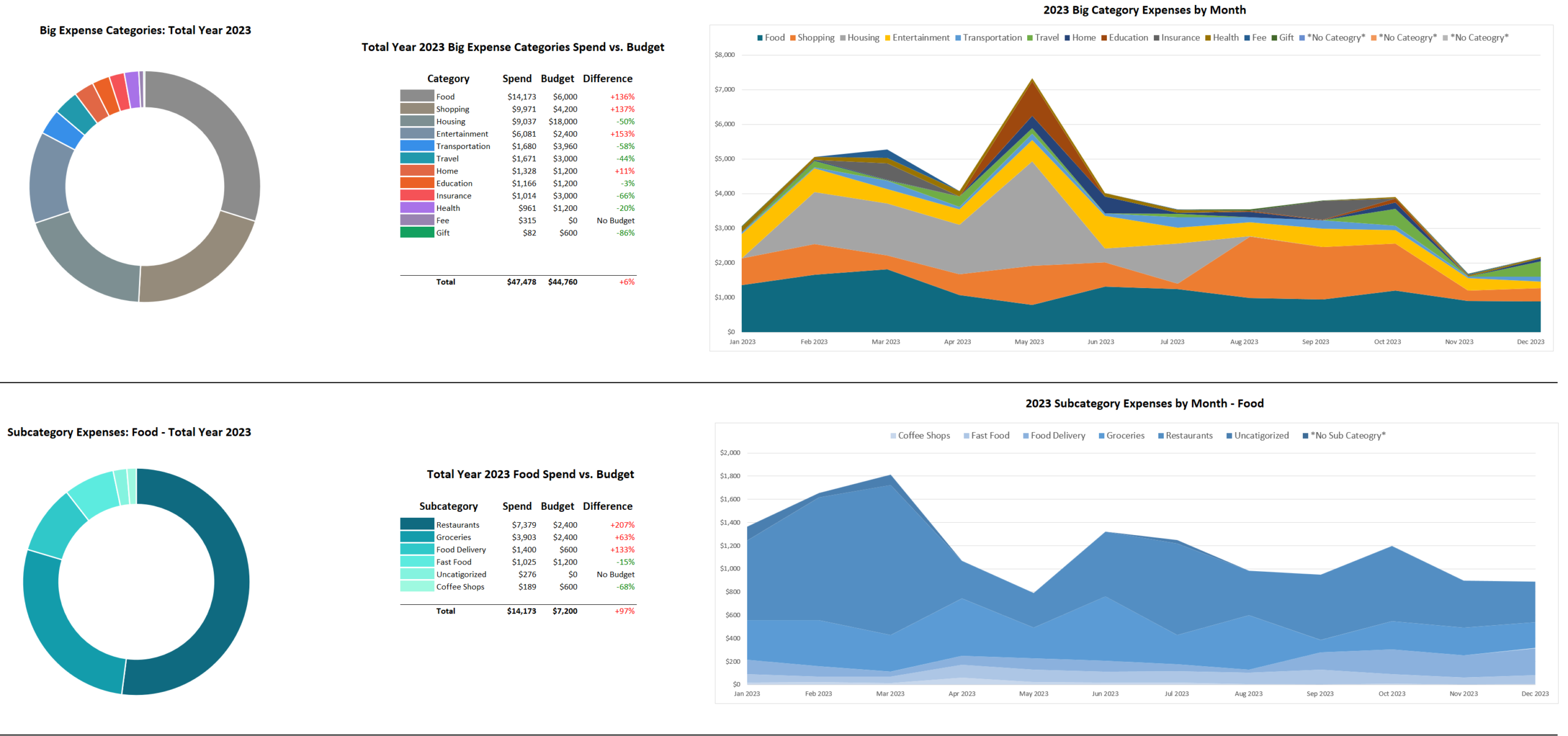
Organize imported transactions into your own categories and subcategories, build monthly budgets, compare actual spending with your plan, and drill into individual transactions.
Credit Card Payment Planning
Estimate upcoming credit card payments, compare predictions with actual statements, and project whether your planned cash position is running toward a surplus or deficit.
Microsoft Excel required. No subscription required. No direct bank connection required.
How it works
Import → Organize → Budget & Analyze → Plan Ahead
For people who want to understand their numbers
The GetMeFi workbook is a good fit if you already export transaction history, want categories that reflect your priorities, use several credit cards, or keep a target amount of cash available in the bank.
You should feel comfortable with everyday spreadsheet tasks: pasting data, selecting dropdowns, entering values, sorting tables, and following instructions. You do not need to build the formulas yourself.
If you enjoy detailed spreadsheets, there is more to explore in the category structure, dashboard controls, individual transactions, and payment-planning views.
Your workbook and guidance to get started
Your one-time purchase includes:
- The GetMeFi Excel personal-finance workbook
- A detailed User Guide for setup and ongoing use
- One year of sample data to explore before importing your own
A few things to know before you buy
Do I need to connect my bank account?
No. You import transaction data yourself into your downloaded workbook.
Do I have to finish a budget first?
No. The BudgetDashboard can analyze your spending before a budget is complete.
Will card payment estimates always match my statements?
Estimates depend on your data and settings. Compare them with actual issuer information, and confirm amounts and dates before making financial decisions. Read All FAQs
Bring your spending and upcoming payments into view
Get the Excel workbook, a year of sample data, and the detailed User Guide for $24.99. Complete the setup once, save your mappings, and build a regular review around your finances.
Microsoft Excel required. No subscription required. No direct bank connection required.